
You just spent four hours writing a comprehensive, well-researched blog post. You hit publish, share it on your social channels, maybe send it to your email list – and then watch as the traffic peaks for 24 to 48 hours before quietly fading into the archives. Sound familiar? This is the unfortunate reality for most content creators who treat blogging as a one-and-done exercise rather than as the starting point of a broader content strategy.
The truth is, a single well-written blog post is not just an article – it is a content goldmine waiting to be unlocked. Every section, every insight, every data point you researched can be reformatted, re-packaged, and redistributed across different platforms to reach entirely new audiences who may never read a blog post in their lives but consume content voraciously through short videos, social media, email, or podcasts.
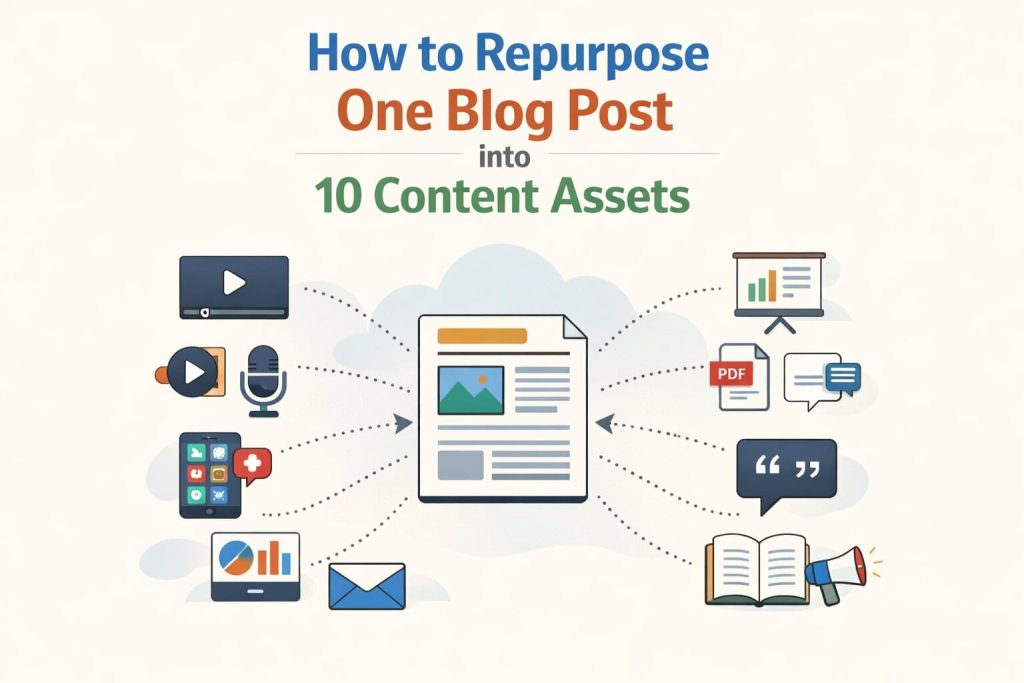
This guide introduces you to a concept called content repurposing – the practice of transforming one original piece of content into multiple formats suited to different platforms and audience preferences. Specifically, you will learn how to extract maximum value from a single blog post by turning it into 10 distinct content assets. By the end of this article, you will have a repeatable system that multiplies your content output without multiplying your workload.
Why Content Repurposing Is a Non-Negotiable Strategy
Before diving into the mechanics of repurposing, it is worth understanding why this strategy is so powerful – and why so many content creators are leaving enormous value on the table by ignoring it.
The Content Multiplication Mindset
Most content creators operate with what could be called a linear content model: write a post, publish it, move on to the next one. This model treats each piece of content as a single-use asset, which means hours of research and writing are compressed into a narrow window of visibility. A content multiplication mindset, by contrast, treats every piece of long-form content as a pillar – a central, comprehensive resource from which dozens of smaller pieces can be derived.
Think of your blog post as the trunk of a tree. Each branch represents a different format: a carousel post on LinkedIn, a short video on Instagram Reels, a thread on X (formerly Twitter), an episode of your podcast. The branches grow from the same trunk but reach in different directions, connecting with people who might never encounter the original content at all. This is not about copying and pasting your blog onto every platform – it is about intelligently adapting your core message for each medium.
The Business Case for Repurposing
The business case for content repurposing is compelling. When you repurpose content strategically, you extend the lifespan of your best ideas far beyond the initial publish date. A blog post that earned two hundred visitors in its first week can continue driving traffic for months or years when it is supported by Pinterest pins, an infographic, a YouTube video, and regular social posts that keep pointing audiences back to it.
Repurposing also addresses a fundamental truth about modern content consumption: different people prefer different formats. Some of your ideal customers love reading in-depth articles. Others only watch short videos. Still others listen to podcasts during their morning commute. By distributing your core ideas across multiple formats, you meet your audience wherever they are rather than hoping they find you in one specific place. The result is a compounding reach effect – each new asset adds a new entry point into your content ecosystem.
Before You Repurpose: Choosing the Right Blog Post
Not every blog post is an equally good candidate for a full repurposing campaign. Choosing the right content to repurpose is the first and arguably most important step in the process. Investing repurposing effort into the wrong post means wasting time on content that will not resonate no matter what format it takes.
Identifying Repurpose-Ready Content
The ideal blog post for repurposing shares a few key characteristics. First, it should be evergreen – meaning its core content remains relevant and accurate regardless of when it is consumed. How-to guides, strategy frameworks, listicles, and educational explainers tend to age well. News roundups and trend reports, by contrast, can become outdated within months.
Second, the post should be comprehensive. A blog post of 1,500 words or more with clearly defined sections, subheadings, and supporting points gives you far more raw material to extract than a brief 500-word opinion piece. The more structured and detailed the original content, the easier it is to break apart into smaller assets.
Third, consider the post’s proven or potential performance. If a post already attracts consistent search traffic, has strong engagement metrics, or addresses a question your audience asks repeatedly, it is a strong signal that the core topic has broad appeal – which means that appeal will likely translate across formats.
A Quick Repurposing Audit Checklist
Before committing to a full repurposing campaign for a specific post, run it through this quick mental checklist:
- Does this post answer a specific, recurring question your audience has?
- Is the content structured with clear headings, steps, or a defined framework?
- Will this content remain relevant and accurate for at least the next 12 months?
- Does it contain data points, frameworks, or step-by-step processes that translate well visually?
- Has it already shown engagement, traffic, or positive reader feedback?
If you answered yes to three or more of these questions, you have a strong repurposing candidate on your hands.
The 10 Content Assets: A Complete Breakdown
Now comes the core of this guide. Below, you will find a detailed breakdown of 10 content assets you can create from a single blog post, complete with explanations of why each format works, how to create it efficiently, and which tools to use.
Asset 1: Social Media Carousel (LinkedIn and Instagram)
A social media carousel is a multi-slide post – typically between five and ten slides – that walks the audience through a set of tips, steps, or insights in a visually engaging format. Carousels consistently rank among the highest-performing post formats on both LinkedIn and Instagram because they encourage extended engagement: viewers swipe through each slide, increasing time-on-post and signaling value to the platform algorithm.
To create a carousel from your blog post, identify the five to seven most impactful takeaways or steps from the article. Each becomes a single slide. Use the blog’s title or core premise as the hook on slide one, dedicate one idea to each subsequent slide, and close with a strong call to action directing viewers back to the full blog post. The key is brevity – each slide should communicate its point in one sentence or a short headline plus two to three supporting words. Tools like Canva make it simple to produce polished carousel graphics using pre-built templates.
Asset 2: Short-Form Video Script (Reels, TikTok, YouTube Shorts)
Short-form video is currently the highest-reach content format across virtually every major platform. A 60 to 90 second video built around one compelling insight from your blog post can outperform months of written content in terms of raw impressions. The important thing to understand is that you do not need to summarize the entire blog in one video – in fact, you should not. Instead, pick the single most surprising, counterintuitive, or actionable point from your post and build a tight script around that one idea.
A strong short-form video script follows a simple three-part structure: an attention-grabbing hook in the first three seconds, a clear and concise delivery of the core insight, and a direct call to action at the end. Write the script as you speak, not as you write – conversational language performs far better on video platforms than formal prose. One blog post with seven major sections can easily yield five to seven individual short videos, making this one of the most efficient repurposing strategies available.
Asset 3: Email Newsletter
Email remains one of the most powerful content distribution channels, consistently delivering higher conversion rates than social media. Your existing email subscribers have already expressed interest in your content by opting in – they are a warm audience who want to hear from you. Turning your blog post into an email newsletter is one of the most straightforward repurposing tasks, but there is an important nuance: do not simply paste the blog into your email.
Instead, write a 300 to 400 word email that distills the blog’s core message in a personal, conversational tone. Introduce the topic with a brief story or observation, share two or three of the most valuable insights from the article, and then link to the full post for readers who want to go deeper. To make your newsletter subscribers feel valued, consider including one exclusive tip or personal reflection that is not in the original blog – something that rewards them for being on your list rather than just finding the content through search.
Asset 4: X (Twitter) Thread
A well-crafted thread on X (formerly Twitter) is one of the most shareable written formats on the internet. Threads allow you to present a structured argument or list of insights in a sequential, scrollable format that keeps readers engaged from start to finish. They also perform exceptionally well algorithmically, especially when they generate replies and reposts in the first hour after publishing.
The structure of a great thread maps almost perfectly onto a well-organized blog post. Your opening tweet serves as the hook – state the problem or make a bold claim that compels people to keep reading. Each subsequent tweet covers one key point, tip, or step from the article. The final tweet ties everything together and links back to the full blog post for readers who want the complete version. A blog with eight subheadings can become an eight to ten tweet thread in under an hour.
Asset 5: Infographic
Infographics are among the most shared and linked-to content formats online. A visually compelling infographic that distills a complex process, framework, or set of statistics into a clear, scannable image can earn backlinks and social shares for months after it is published. They work particularly well for blog posts that present a step-by-step process, a comparison, or data-heavy information that benefits from visual organization.
To create an infographic from your blog post, identify the most structured section – a step-by-step process, a numbered list, or a set of statistics works best. Map this content into a vertical, top-to-bottom visual flow with each point represented by a short label, icon, and brief explanation. Canva, Venngage, and Piktochart all offer free templates that make it easy to produce professional-looking infographics without a design background. Once created, your infographic can be published on Pinterest, shared on social media, embedded in the blog post itself to increase dwell time, and submitted to infographic directories for additional SEO backlinks.
Asset 6: YouTube Long-Form Video or Podcast Episode
While short-form video captures attention, long-form video and audio content build deep trust. A 5 to 15 minute YouTube video or podcast episode based on your blog post allows you to go beyond bullet points and actually demonstrate your thinking process, share personal experience, and connect with your audience on a more human level. Critically, these formats also reach people who simply do not read blog posts – the growing segment of the population that prefers to learn by watching or listening rather than reading.
The most effective approach is to use your blog post as a structural outline rather than a word-for-word script. Let the headings guide the flow of your recording, but speak naturally and add examples, anecdotes, and commentary that were not in the original text. This makes the video or podcast feel like a genuine expansion of the written content rather than a robotic reading of it. Perhaps most importantly, a single recording session can produce both a YouTube video and a podcast episode simultaneously, doubling your distribution with no additional effort.
Asset 7: Pinterest Pins
Pinterest is often overlooked by content marketers focused on Instagram and LinkedIn, but it remains one of the most powerful platforms for driving long-term, evergreen traffic to blog content. Unlike social media posts that disappear within hours, Pinterest pins continue to surface in search results for months and even years after they are published. This makes Pinterest an especially valuable channel for repurposing evergreen blog content.
For each blog post you repurpose, create three to five vertical pins – ideally in a 2:3 aspect ratio – featuring visually appealing text overlays of the post’s title, a compelling quote, or a key tip. Each pin should link directly back to the blog post URL. If you have created an infographic as part of your repurposing campaign, a tall version of that infographic formatted for Pinterest can become one of your highest-performing pins. The key to Pinterest success is consistency and search-optimized pin descriptions using the same keywords your blog post targets.
Asset 8: Downloadable Lead Magnet (PDF Checklist or Cheat Sheet)
One of the most valuable actions a blog reader can take is subscribing to your email list, and a well-designed lead magnet is the most effective way to incentivize that subscription. By transforming your blog post’s core framework or step-by-step process into a clean, downloadable PDF checklist or cheat sheet, you create an asset that delivers immediate, tangible value to your reader in exchange for their email address.
The process is straightforward: distill the most actionable elements of your blog post into a one or two page format that a reader can print out or reference on their desktop. A checklist works best for process-oriented posts, while a cheat sheet or reference guide works well for educational or strategy-focused content. Embed a prominent opt-in form within the blog post itself – ideally both within the body of the content and at the end – that offers the PDF download in exchange for an email address. Over time, a single well-crafted lead magnet can convert thousands of organic blog readers into email subscribers.
Asset 9: LinkedIn Article or Medium Post
Republishing a version of your blog post on LinkedIn or Medium might seem redundant, but both platforms have significant built-in audiences that discover content through their internal recommendation algorithms. A thoughtful LinkedIn article can reach thousands of professionals who would never find your blog through a Google search, and Medium’s Partner Program can even generate a small income from reads.
The key is not to copy and paste your original post verbatim. Instead, lightly rewrite the introduction to speak more directly to the platform’s specific audience – professionals and business readers on LinkedIn, curious generalists on Medium – and consider adding a new case study, a recent example, or a personal story that was not in the original. Always include a brief author bio at the end with a link back to your website or the original blog post. To protect your SEO, wait two to four weeks after publishing the original post before cross-posting, which gives Google time to index and establish the canonical source of the content.
Asset 10: Slide Deck or Webinar Presentation
Turning your blog post into a slide deck or live webinar presentation is one of the most powerful yet underused repurposing strategies available. A well-designed slide deck shared on LinkedIn or SlideShare positions you as a credible, authoritative voice in your field and continues to generate views and shares long after it is uploaded. A live webinar built around the same content takes this a step further, transforming your written insights into an interactive lead generation event that can attract new subscribers, clients, or customers.
The structure of your blog post maps naturally onto a presentation format. Each major heading becomes a section of the deck, each supporting point becomes a slide, and your conclusion becomes a closing summary with a clear call to action. Aim for one idea per slide and use visuals, icons, and short text rather than long paragraphs. If you plan to run a webinar, use the slide deck as your framework and prepare to speak to each section conversationally, leaving time for audience questions at the end. The recording of that webinar then becomes yet another content asset – extending your reach even further.
The Repurposing Workflow: A Step-by-Step System
Having 10 content assets to create might feel overwhelming at first, but with the right workflow in place, the process becomes efficient and even enjoyable. The secret is batching – grouping similar tasks together and moving through them in focused sessions rather than trying to create every asset type in a single sitting.
Step 1: Extract Your Core Content Elements
Before creating any asset, spend 20 to 30 minutes extracting the raw material from your blog post. Go through the article and pull out the key points for carousels and threads, data or statistics that would work well in an infographic, direct quotes or bold statements suitable for social media posts, the step-by-step process or checklist for the lead magnet, and the main argument or framework for the video or podcast outline. Organize these extractions in a simple document or spreadsheet. This master list becomes the source material for all 10 assets.
Step 2: Batch Create by Format Type
Rather than creating assets one by one, group them by format type and tackle each group in a dedicated session. A written assets session might cover the email newsletter, X thread, and LinkedIn article in two to three hours. A visual assets session – carousels, infographic, and Pinterest pins – can be knocked out efficiently using Canva templates. A video and audio session handles the YouTube video and short-form clips. Batching dramatically reduces the cognitive overhead of switching between different types of creative work.
Step 3: Distribute on a Staggered Schedule
Avoid the temptation to release all 10 assets at once. Staggering your distribution over three to four weeks keeps your brand consistently visible in your audience’s feeds rather than flooding them in a single day and then going silent. A practical distribution schedule might look like this:
- Week 1: Publish the blog post, send the email newsletter, publish the LinkedIn article
- Week 2: Post the social media carousel, publish the X thread, upload Pinterest pins
- Week 3: Release short-form videos (two to three clips), publish the infographic
- Week 4: Promote the lead magnet with a dedicated email, share the slide deck or host the webinar
Step 4: Track Performance and Iterate
After running your first full repurposing campaign, take time to analyze which asset formats drove the most traffic, engagement, or conversions. You will likely find that two or three formats significantly outperform the others for your specific audience. Use this data to prioritize those formats in future campaigns. Over time, your repurposing system becomes increasingly efficient as you build templates, refine your workflow, and focus your energy on the formats that consistently deliver results.
Recommended Tools for Content Repurposing
The right tools can dramatically speed up your repurposing workflow. The following selection covers every major format category and includes free or freemium options suitable for creators at any budget level.
Design and Visual Assets
Canva is the most versatile tool in any content repurposer’s toolkit. It offers professionally designed templates for carousels, infographics, Pinterest pins, PDF checklists, and slide decks, and its drag-and-drop interface makes it accessible to anyone regardless of design experience. Adobe Express is a strong alternative for quick social graphics and short video clips. Both offer free tiers with sufficient functionality for most repurposing needs.
Video and Audio Creation
Descript stands out as a particularly powerful tool for content repurposers because it handles both video editing and audio recording, and it allows you to edit video by editing the text transcript – making the process far more intuitive than traditional timeline-based editing. Riverside.fm is the gold standard for high-quality podcast and video recording with remote guests. For short-form video editing optimized for Reels and TikTok, CapCut offers a powerful free mobile and desktop app with built-in templates and auto-caption features.
Writing, Email, and Scheduling
For email newsletters, Beehiiv and ConvertKit (now rebranded as Kit) are the leading platforms for creators, offering clean templates, list management, and strong deliverability. For scheduling social media posts across multiple platforms, Buffer and Later both offer intuitive interfaces and free plans. Metricool is worth exploring for teams that need all-in-one scheduling, analytics, and reporting across multiple channels from a single dashboard.
Frequently Asked Questions
Q1. Is content repurposing considered duplicate content by Google?
No, and this is one of the most common misconceptions about repurposing. Google’s duplicate content concerns relate to identical or near-identical text appearing on multiple URLs within the same website – pages that compete with each other for the same search query. Repurposing your content into videos, infographics, social media posts, and PDFs carries no such risk because these are different formats on different platforms. Even when you cross-post a written version of your content to LinkedIn or Medium, you can protect your original post’s SEO authority by setting a canonical tag pointing back to your own domain, or simply by waiting a few weeks for Google to index and credit your original first.
Q2. How do I know which blog posts are worth repurposing?
The best candidates for repurposing are blog posts that are evergreen (relevant beyond the current news cycle), comprehensive (1,500 or more words with a clear structure), and either already performing well in search or addressing a question your audience asks consistently. Check your Google Analytics for posts with steady organic traffic over three or more months, and your Search Console for posts ranking on page two or three – these are posts that a repurposing push might elevate to page one. Also pay attention to posts that generate replies, shares, or comments, as these signals indicate genuine audience resonance.
Q3. Do I need to create all 10 assets every time?
Absolutely not – and trying to do so for every post would quickly become unsustainable. The 10 assets in this guide represent the full menu of possibilities, not a mandatory checklist. Start by identifying the two or three formats most relevant to your audience and the platforms where you are most active. If your audience lives on LinkedIn and email, prioritize carousels, newsletters, and LinkedIn articles. If you are building a YouTube channel alongside your blog, focus on long-form video and short clips. As you build your repurposing system and templates, you can expand into additional formats over time.
Q4. How long does it realistically take to repurpose one blog post into 10 assets?
With established templates and a batched workflow, creating all 10 assets typically takes between six and ten hours spread across multiple sessions. The first time you do it, expect it to take longer as you build your templates and figure out your process. By the third or fourth repurposing campaign, many creators report completing the full set of assets in four to six hours. The investment pays for itself quickly: those hours of repurposing work can generate months of consistent content distribution from a single original piece of writing.
Q5. Can I use AI tools to speed up the repurposing process?
Yes, and AI tools are genuinely useful here when used thoughtfully. Large language models can generate first drafts of email newsletters, X threads, LinkedIn article introductions, and video scripts based on a pasted blog post remarkably quickly. The key is to treat AI output as a first draft that needs editing and personalization rather than as a finished product. Your brand voice, personal stories, and specific audience nuances will always require a human editorial pass. AI works best as a drafting assistant that removes the blank-page problem, letting you spend your time refining rather than starting from scratch.
Conclusion
The biggest shift in content marketing over the past decade is not about writing better content – it is about distributing existing content more intelligently. Every blog post you write represents hours of research, thinking, and craft. Letting that work disappear after 48 hours of traffic is not just inefficient; it is leaving a substantial amount of value – and reach – on the table.
The repurposing framework in this guide gives you a practical, repeatable system for extracting the full potential from every piece of long-form content you create. You do not need to implement all 10 assets overnight. Start with one blog post and choose three formats that fit your current platforms and audience. Build your templates, run your first campaign, review the results, and then expand from there. The compounding effect of consistent repurposing – more touchpoints, more platforms, more entry points into your content ecosystem – builds audience and authority in ways that publishing more new content alone simply cannot match.
Create once. Distribute everywhere. That is not just a tagline – it is the most sustainable content strategy available to you today.